
AI Prompts for Freelancers (2026) — Build Prompt Systems That Scale Your Work
Most freelancers use AI — but very few use it effectively.
The difference is not the tool. It is the prompt system.
- Random prompts → inconsistent outputs
- Manual corrections → wasted time
- No structure → no scalability
This guide explains how AI prompts for freelancers evolve from simple inputs into structured systems that control output, automate workflows, and create scalable execution.
What You’ll Learn
- How AI prompts work as systems—not just inputs
- Types of prompts and when to use each
- How to build reusable prompt templates
- How to create full prompt workflows for automation
- Best AI prompt tools and how they integrate
AI Prompts for Freelancers — Overview & System Breakdown
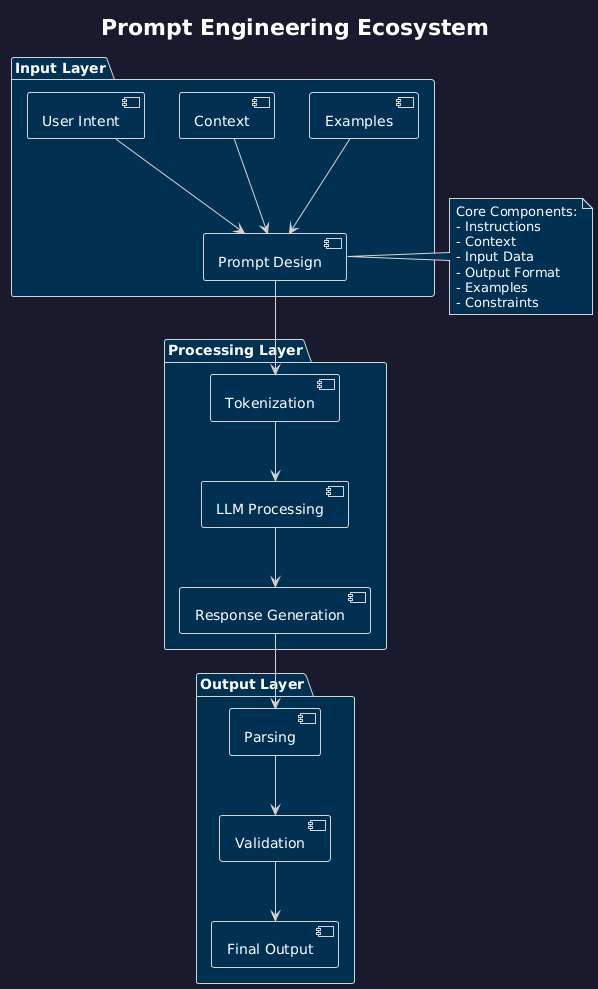
AI prompts for freelancers are structured instruction systems that control how AI tools generate outputs, make decisions, and execute workflows. They are not simple inputs—they are the control layer that determines the quality, consistency, and reliability of AI-driven work.
The best AI prompts for freelancers combine structure, logic, and repeatability to produce consistent outputs across content, communication, and decision-making workflows.
Freelancers operate in environments where execution depends on speed, clarity, and repeatability. Every deliverable—content, communication, research, and decisions—directly impacts income. Without structured prompting, AI outputs become inconsistent, requiring constant correction and increasing execution time.
This creates a structural limitation:
Unstructured prompts → inconsistent outputs → repeated effort → limited scalability
Most freelancers use AI reactively. They input instructions, evaluate outputs, and repeat the process. This creates friction and prevents scalability.
AI prompts remove this limitation by transforming AI usage into a system-driven process. Instead of relying on ad-hoc inputs, freelancers design prompt frameworks that produce predictable, repeatable outcomes.
Within the ecosystem of AI tools for freelancers, prompts act as the control layer—the system that directs how all other tools operate.
They integrate directly with:
• automation systems → workflow execution control
• productivity systems → task structuring
• finance systems → decision support
• client systems → communication and conversion
Freelancer Scenario:
A freelance writer producing content manually may spend 4–6 hours per article. By implementing structured prompt templates, the same output can be generated in minutes and refined—reducing execution time while maintaining consistency and quality.
System Contrast:
Manual AI usage:
• reactive prompting
• inconsistent outputs
• repeated corrections
Prompt system model:
• structured execution
• predictable outputs
• scalable workflows
Authority Insight:
AI tools do not create leverage. Structured prompt systems create leverage.
Quick Answer (AI Overview): AI prompts for freelancers are structured instructions that control AI outputs, enabling consistent content creation, automated workflows, and scalable execution across freelance systems.
AI Overview Summary: AI prompts act as the control layer that transforms AI tools into structured systems, enabling freelancers to generate consistent, scalable, and high-quality outputs.
Authority Doctrine:
Freelancers who use AI casually stay inconsistent. Freelancers who build prompt systems scale execution.
What Are AI Prompts for Freelancers
AI prompts are structured instruction systems that define how AI tools interpret inputs, process information, and generate outputs. They are not simple commands—they are repeatable frameworks that control execution.
AI Overview Answer: AI prompts are structured inputs that guide AI tools to generate accurate, consistent, and high-quality outputs by defining context, instructions, constraints, and format.
Instead of thinking in single inputs, prompts must be understood as systems. A well-designed prompt does not just produce an output—it creates a repeatable execution process.
Prompt System Model:
• input → structured instruction
• processing → AI interpretation and reasoning
• output → content, decision, or action
• feedback → evaluation of output quality
• optimization → refinement into reusable templates
Prompt Architecture:
Every high-quality prompt includes:
• context → defines the situation or background
• instruction → defines the task to be executed
• constraints → defines rules, tone, or limitations
• format → defines how the output should be structured
This transforms prompting into a controlled execution loop:
Prompt → AI processing → output → evaluation → refinement → reuse
Freelancer Scenario:
A freelancer writing client proposals manually creates each response from scratch, leading to inconsistency and time loss. By using structured prompt templates, the freelancer generates high-quality proposals instantly with consistent tone, structure, and clarity.
Execution Comparison Example:
Weak prompt:
“Write about freelancing”
Structured prompt:
“Act as a freelance strategist. Write a structured article on pricing strategies for beginner freelancers, including examples, step-by-step guidance, and clear headings.”
System Contrast:
Unstructured prompting:
• vague inputs
• unpredictable outputs
• repeated revisions
Structured prompt system:
• clear inputs
• controlled outputs
• minimal corrections
Advanced Prompting Layer:
Modern prompt systems include:
• role-based prompting → assigning AI a role (expert, strategist)
• chain-of-thought prompting → step-by-step reasoning
• template prompting → reusable prompt frameworks
These approaches transform prompts from simple instructions into scalable systems.
System Insight:
The effectiveness of AI is not determined by the tool—it is determined by the quality of the prompt system controlling it.
Authority Insight:
Prompts are not inputs to AI. They are the interface that defines how AI operates within your system.
Doctrine:
Clarity in prompts creates control in outputs. Control in outputs creates scalable systems.
Freelancer AI Prompts Challenge
The primary challenge freelancers face with AI prompts is not access to tools—it is the lack of structured prompting systems. Most freelancers interact with AI in an unstructured, trial-and-error manner, which leads to inconsistent outputs and inefficient workflows.
AI Overview Answer: Freelancers struggle with AI prompts because they lack structured prompting systems, resulting in inconsistent outputs, repeated revisions, and inefficient use of AI tools.
AI tools are widely available, but without structured prompts, they fail to deliver reliable results. This creates a hidden inefficiency that limits the true potential of AI.
Core Challenges:
• vague instructions → unclear AI outputs
• inconsistent results → lack of repeatability
• excessive revisions → wasted time
• no reusable systems → repeated manual effort
• tool dependency → no control over output quality
Freelancer Scenario:
A freelancer uses AI to generate content but rewrites outputs multiple times due to poor prompt structure. This creates the illusion of productivity while actually increasing total workload.
System Problem:
Unstructured prompts → inconsistent outputs → repeated corrections → time loss → reduced scalability
This problem compounds as workload increases. The more a freelancer relies on unstructured prompting, the more inefficient the system becomes.
Behavioral Failure Loop:
poor prompts → weak outputs → frustration → more manual editing → avoidance of structure → continued inefficiency
This loop prevents freelancers from fully leveraging AI.
System Contrast:
Unstructured prompting model:
• reactive usage
• unpredictable outputs
• high correction effort
Structured prompt system:
• proactive design
• predictable outputs
• minimal correction required
Hidden Constraint:
Most freelancers believe AI is the limitation. In reality, the limitation is the absence of structured prompting.
System Insight:
AI performance is not determined by the tool—it is determined by the quality of the prompt system controlling it.
Authority Insight:
Freelancers who rely on AI without prompt systems remain operators. Freelancers who design prompt systems become system builders.
Doctrine:
You cannot scale AI with unstructured input. You must structure prompts to scale output.
AI Prompt System Model
AI prompts do not function as isolated inputs—they operate as a continuous system that transforms tasks into structured, repeatable workflows. This system replaces manual thinking with predefined logic, enabling freelancers to scale output without increasing effort.
AI Overview Answer: The AI prompt system model is a structured loop where prompts guide AI outputs, which are then refined and reused to create scalable, repeatable workflows.
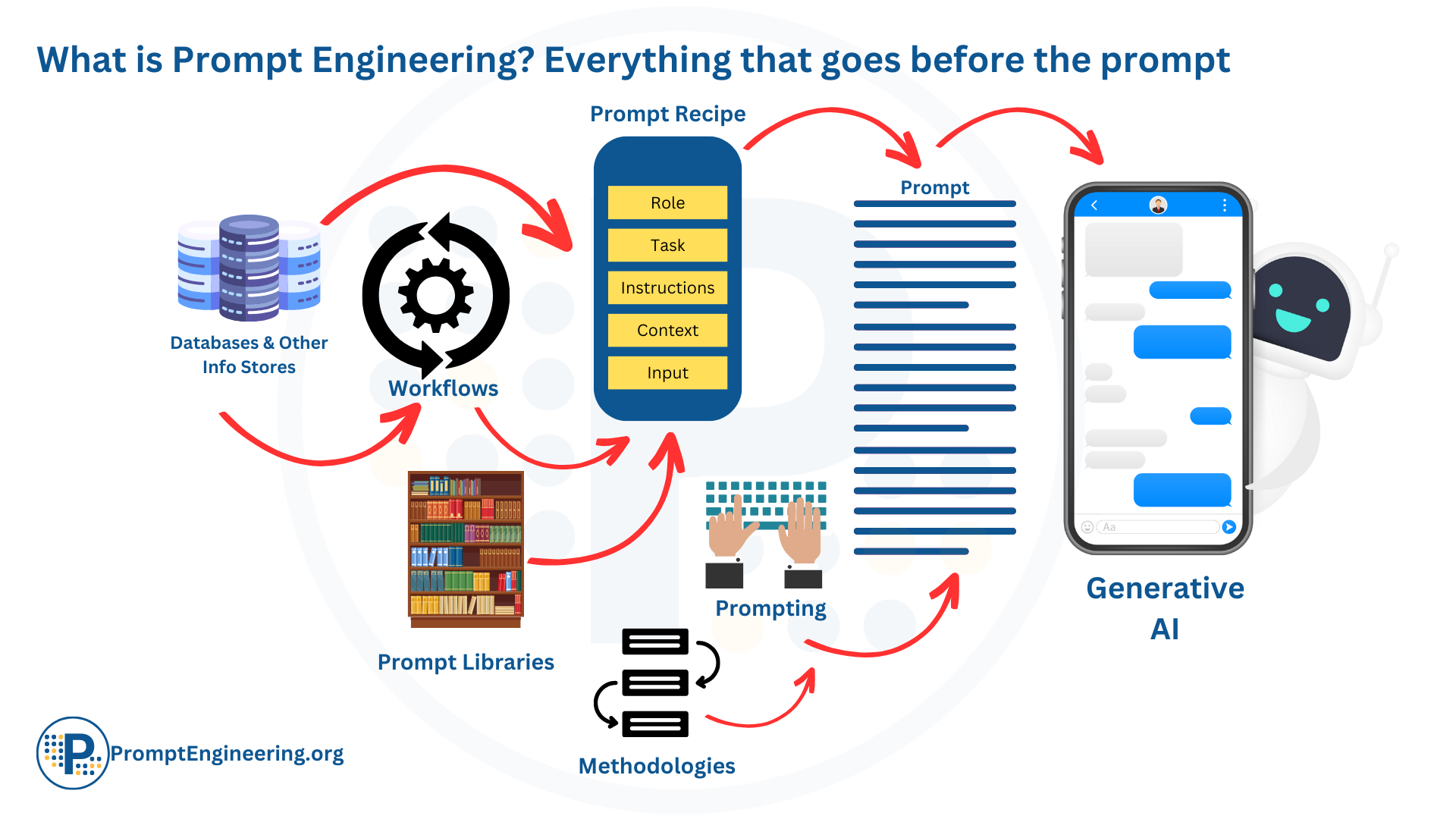
AI Prompt System Model — from input to optimized output
The system operates as a compounding execution loop:
• input → structured prompt (context + instruction)
• processing → AI interprets logic and generates output
• output → content, response, or decision
• feedback → evaluation and refinement
• optimization → prompt improvement and reuse
This loop is cyclical—not linear. Each iteration improves prompt quality, output consistency, and system efficiency.
Freelancer Scenario:
A freelancer writing proposals initially creates each response manually. After building a structured prompt system, the freelancer generates high-quality proposals instantly, refines the prompt once, and reuses it across all future clients.
Compounding Effect:
Manual execution model:
• task repeated every time
• effort scales with workload
Prompt system model:
• task defined once as a prompt
• output generated repeatedly
• effort does not scale with workload
Each optimized prompt removes future effort permanently. Over time, freelancers build a library of prompts that function as reusable systems.
System Layers Within Prompt Model:
• instruction layer → defines task execution
• context layer → provides background and clarity
• logic layer → introduces reasoning and conditions
• format layer → structures output consistency
These layers ensure that outputs are not just generated—but controlled.
System Integration:
The AI prompt system connects with the broader freelance ecosystem:
• automation systems → prompts trigger workflows
• productivity systems → prompts structure execution
• finance systems → prompts guide decisions
• client systems → prompts optimize communication
System Contrast:
Non-system AI usage:
• random prompting
• inconsistent outputs
• repeated effort
Prompt system model:
• structured prompting
• predictable outputs
• scalable workflows
Authority Insight:
At scale, prompts evolve from instructions into operational systems that control execution across the entire freelance business.
System Insight:
The value of prompts is not in individual outputs—it is in their ability to create repeatable systems that eliminate manual thinking.
Doctrine:
Freelancers do not scale by working faster. They scale by converting thinking into systems.
Types of AI Prompts
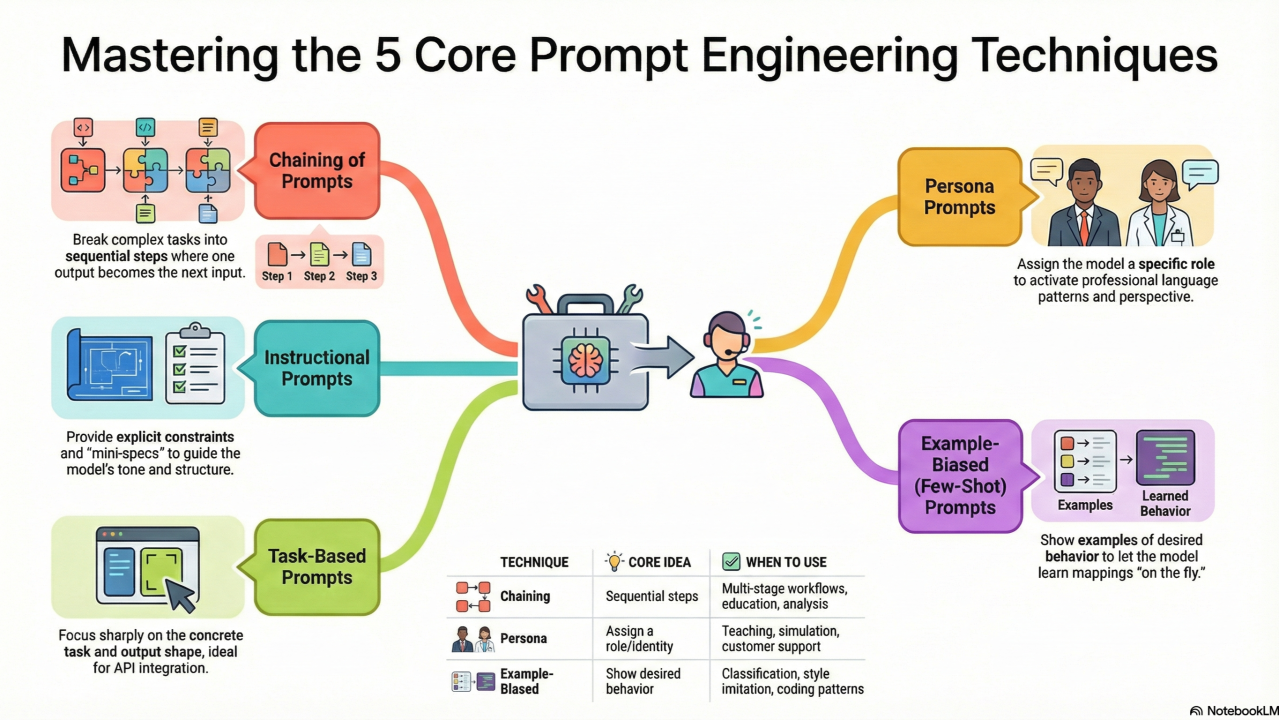
AI Prompt Types — layered system for structured execution
AI prompts for freelancers operate across multiple system layers, each designed to control a specific type of output. Understanding these types is critical because no single prompt structure works for all tasks. Effective prompt systems are built by combining different prompt types into structured workflows.
AI Overview Answer: AI prompts for freelancers include instruction prompts, role-based prompts, template prompts, and reasoning prompts, each designed to control different types of AI outputs and workflows.
Each prompt type serves a distinct function within the execution system. Together, they create a complete prompting framework that enables consistent, scalable results.
1. Instruction-Based Prompts
Definition: Instruction prompts define a specific task for the AI to execute.
Function:
• direct task execution
• clear output generation
• minimal ambiguity
Example:
“Write a 1000-word article on freelance pricing strategies with actionable steps.”
Freelancer Scenario:
A freelancer generates blog content quickly using structured instructions instead of writing manually.
System Insight:
Instruction prompts are the foundation of execution—but without structure, they produce inconsistent results.
2. Role-Based Prompts
Definition: Role-based prompts assign the AI a specific identity or expertise.
Function:
• improves output quality
• adds domain expertise
• enhances tone and authority
Example:
“Act as a freelance marketing strategist and create a client acquisition plan.”
Freelancer Scenario:
A freelancer generates expert-level proposals by assigning AI a specialist role instead of using generic prompts.
System Insight:
Role assignment transforms AI from a generic tool into a domain-specific system.
3. Template Prompts (Reusable Systems)
Definition: Template prompts are structured prompts designed for repeated use.
Function:
• consistency across outputs
• reusable workflows
• reduced thinking effort
Example:
“Create a client proposal using this structure: introduction → problem → solution → pricing → CTA.”
Freelancer Scenario:
A freelancer builds a proposal template and reuses it across all clients, eliminating repetitive work.
System Insight:
Templates convert one-time effort into permanent systems.
4. Chain-of-Thought Prompts (Reasoning Systems)
Definition: These prompts guide AI through step-by-step reasoning before generating outputs.
Function:
• improves accuracy
• enhances logical thinking
• supports complex tasks
Example:
“Analyze this business problem step-by-step and then provide a solution.”
Freelancer Scenario:
A freelancer solves complex client problems using structured reasoning instead of guesswork.
System Insight:
Reasoning prompts transform AI from a generator into a decision-support system.
5. Constraint-Based Prompts
Definition: These prompts define rules, tone, format, or limitations for outputs.
Function:
• control output style
• enforce structure
• reduce irrelevant responses
Example:
“Write in a professional tone, under 800 words, with bullet points and clear headings.”
Freelancer Scenario:
A freelancer ensures all outputs match brand voice and formatting requirements.
System Insight:
Constraints create precision. Without constraints, outputs drift.
6. Multi-Step Workflow Prompts
Definition: These prompts combine multiple steps into a single structured workflow.
Function:
• automate complex processes
• reduce manual coordination
• enable system-level execution
Example:
“Research the topic → create an outline → write the article → optimize for SEO.”
Freelancer Scenario:
A freelancer automates content creation from research to final output using a single structured prompt.
System Insight:
Workflow prompts transform isolated tasks into complete systems.
System Interaction Model:
Instruction → role → template → reasoning → constraints → workflow
This layered interaction creates a complete prompt system rather than isolated inputs.
System Contrast:
Single prompt usage:
• limited control
• inconsistent output
Layered prompt system:
• structured execution
• predictable results
Authority Insight:
Freelancers who use one type of prompt stay limited. Freelancers who combine prompt types build systems.
Doctrine:
Prompts are not individual tools. They are layers of a system that control output.
Core Layer 2 — Role-Based Prompt Systems
AI Overview Answer: Role-based prompt systems assign AI a specific identity or expertise, enabling freelancers to generate higher-quality, domain-specific outputs with greater accuracy and authority.
Role-based prompts introduce intelligence into AI systems by defining how the AI should think, not just what it should do. This layer transforms AI from a generic tool into a specialized system.
Instead of giving instructions alone, freelancers assign roles such as strategist, copywriter, analyst, or consultant. This changes how AI interprets the task and improves output quality significantly.
System Function:
• define expertise (who the AI is)
• influence tone and depth
• improve contextual understanding
• enhance output relevance
Execution Model:
Role assignment → instruction → AI reasoning → output
This layer builds directly on instruction prompts but adds a critical dimension: expertise simulation.
Freelancer Scenario:
A freelancer creating client proposals can use:
“Act as a freelance business strategist. Create a high-converting proposal for a client seeking SEO services.”
This produces significantly better results than a generic prompt because the AI adopts a strategic mindset.
System Contrast:
Without role-based prompting:
• generic responses
• shallow insights
• inconsistent tone
With role-based systems:
• expert-level outputs
• deeper insights
• consistent positioning
Quality Impact Example:
Generic prompt:
“Write a marketing plan”
Role-based prompt:
“Act as a senior freelance marketing strategist and create a detailed client acquisition plan with step-by-step execution.”
The second output is more structured, strategic, and actionable.
System Insight:
AI does not inherently possess context—it simulates it based on the role you assign.
This means role-based prompts directly control:
• output depth
• strategic thinking
• communication style
Common Failure Condition:
Freelancers often skip role definition, which leads to weak outputs even when instructions are clear.
Limitations of This Layer:
Role-based prompts improve quality but still lack:
• repeatability (no system structure)
• workflow integration
• consistency across tasks
This is why template systems (next layer) are required.
System Evolution:
Instruction prompts → role-based prompts → template systems → full prompt architecture
Authority Insight:
Freelancers who use AI without roles get average outputs. Freelancers who assign roles get expert-level outputs.
Doctrine:
Define the role to define the output. Undefined roles create undefined results.
Core Layer 3 — Template Prompt Systems
AI Overview Answer: Template prompt systems are reusable, structured prompts that allow freelancers to generate consistent outputs across multiple tasks without repeating manual effort.
Template prompts are the foundation of scalable AI systems. They convert one-time prompt creation into reusable frameworks that can be applied repeatedly across workflows.
At this layer, freelancers stop writing prompts from scratch and begin building structured systems that standardize output generation.
System Function:
• create reusable prompt structures
• ensure output consistency
• eliminate repeated thinking
• enable workflow standardization
Execution Model:
Template prompt → input variables → AI processing → structured output
This allows freelancers to reuse the same prompt system across multiple tasks by simply changing inputs.
Freelancer Scenario:
A freelancer handling multiple clients creates a proposal template:
“Act as a freelance strategist. Create a proposal using this structure: introduction → client problem → solution → pricing → CTA. Customize based on [client industry] and [project scope].”
This template can be reused for every client, reducing effort while maintaining quality.
System Contrast:
No template system:
• prompts created from scratch
• inconsistent structure
• time-consuming execution
Template system:
• reusable frameworks
• consistent outputs
• faster execution
Scalability Impact:
Manual prompting:
• effort increases with workload
Template prompting:
• effort remains constant
• output scales automatically
Advanced Template Structure:
High-performing templates include:
• role definition → who the AI is
• structured sections → predefined output format
• variables → dynamic inputs
• constraints → tone, length, style
This transforms prompts into modular systems.
Example Template System:
Content creation template:
“Act as an SEO strategist. Create a [word count] article on [topic] including introduction, structured sections, examples, and conclusion. Maintain professional tone and actionable insights.”
This single template can generate unlimited content variations.
System Insight:
Templates convert knowledge into systems. Once created, they eliminate the need for repeated thinking.
Common Failure Condition:
Freelancers often create templates without structure, leading to:
• inconsistent outputs
• poor adaptability
• limited scalability
Limitations of This Layer:
Template systems improve scalability but still lack:
• dynamic decision-making
• multi-step execution logic
This is solved in the next layer: workflow prompts.
System Evolution:
Instruction → role → template → workflow systems
Authority Insight:
Freelancers who use prompts repeatedly stay busy. Freelancers who build templates eliminate repetition.
Doctrine:
Build once. Use infinitely.
Core Layer 4 — Workflow Prompt Systems
AI Overview Answer: Workflow prompt systems combine multiple prompt steps, logic, and conditions into a single structured process, allowing freelancers to automate complex tasks and build scalable AI-driven workflows.
Workflow prompt systems represent the highest level of AI prompting. At this stage, prompts no longer generate isolated outputs—they execute complete workflows.
This layer transforms AI from a content generator into a system that manages multi-step processes.
System Function:
• combine multiple prompt types into one system
• automate sequential tasks
• introduce conditional logic (if/then decisions)
• reduce manual coordination
Execution Model:
Trigger → prompt sequence → AI processing → conditional logic → output → feedback → optimization
This creates a self-operating loop rather than a one-time interaction.
Freelancer Scenario:
A freelancer builds a content system using a single workflow prompt:
“Research topic → generate outline → write article → optimize for SEO → summarize key points.”
Instead of executing each step manually, the workflow prompt handles the entire process.
System Contrast:
Manual workflow:
• multiple tools
• repeated steps
• constant supervision
Workflow prompt system:
• unified execution
• automated sequence
• minimal supervision
Conditional Logic Layer:
Workflow prompts introduce decision-making into AI systems:
• If output quality is low → regenerate with improved constraints
• If client type = premium → adjust tone and depth
• If content length > limit → summarize
This allows prompts to adapt dynamically instead of producing static outputs.
Multi-Step Workflow Example:
Client onboarding workflow:
Lead input → qualification prompt → proposal generation → follow-up message → onboarding instructions
This replaces multiple manual steps with a single structured system.
Compounding Effect:
Single-step prompts:
• isolated outputs
• limited scalability
Workflow prompt systems:
• complete processes automated
• exponential scalability
Each workflow removes entire sequences of manual work—not just individual tasks.
System Integration:
Workflow prompts connect directly with:
• automation systems → trigger execution
• productivity systems → manage tasks
• client systems → handle communication
• finance systems → guide decisions
System Insight:
The true power of AI is not in generating outputs—it is in executing workflows.
Common Failure Condition:
Freelancers often stop at templates and never build workflow systems, limiting scalability.
Authority Insight:
At scale, prompt systems evolve into operational engines that control entire business processes.
Doctrine:
Single prompts create outputs. Workflow prompts create systems.
Which AI Prompt System Should You Use?
The right prompt system depends on your workflow stage:
- Beginner: Instruction prompts → simple task execution
- Intermediate: Role-based prompts → improve quality
- Consistency stage: Template prompts → repeatable systems
- Advanced: Workflow prompts → full automation
Start with clarity, then structure prompts, then build templates, and finally automate workflows.
Best AI Prompt Tools for Freelancers
AI prompt tools are not standalone solutions—they are execution environments where prompt systems operate. The effectiveness of these tools depends not on their features, but on how well they integrate into structured prompt workflows.
AI Overview Answer: The best AI prompt tools for freelancers include ChatGPT, Claude, Notion AI, and prompt libraries, each serving a different role in building scalable prompt systems and workflows.
Instead of choosing a single tool, freelancers must build a tool stack where each platform performs a specific function within the prompt system.
1. ChatGPT — Core Execution Engine
Best For:
• flexible prompt execution
• content generation
• general-purpose workflows
System Role:
ChatGPT acts as the primary execution layer where prompts are tested, refined, and deployed across multiple freelance tasks.
Example Workflow:
Prompt template → content generation → refinement → final output
When NOT to Use:
• when deep reasoning or long-context analysis is required
• when strict workflow structuring is needed
System Insight:
ChatGPT is the most versatile tool, but its performance depends entirely on prompt quality.
2. Claude — Reasoning & Depth Engine
Best For:
• long-form content
• deep analysis
• structured reasoning tasks
System Role:
Claude enhances prompt systems by adding depth, clarity, and logical reasoning to outputs that require higher accuracy.
Example Workflow:
Initial draft (ChatGPT) → refinement and expansion (Claude)
When NOT to Use:
• for simple or repetitive tasks
• when speed is the priority
System Insight:
Claude is not a replacement for execution tools—it is a depth layer that improves output quality.
3. Notion AI — Workflow Integration Layer
Best For:
• content systems
• documentation
• structured workflows
System Role:
Notion AI integrates prompts into organized systems, allowing freelancers to manage, store, and execute workflows within a single environment.
Example Workflow:
Prompt template stored in Notion → content generation → organized output database
When NOT to Use:
• for highly flexible or experimental prompting
• for complex reasoning tasks
System Insight:
Notion AI transforms prompts into organized systems, improving consistency and workflow visibility.
4. Prompt Libraries — Scalability Layer
Best For:
• storing reusable prompts
• building prompt systems
• scaling workflows
System Role:
Prompt libraries act as the memory system of your prompt architecture, allowing high-performing prompts to be reused across tasks.
Example Workflow:
Optimized prompt → stored in library → reused across multiple clients
When NOT to Use:
• when prompts are unstructured or untested
• without a clear system for organization
System Insight:
Without a prompt library, freelancers repeat work. With a library, they build scalable systems.
System Stack Model:
ChatGPT → execution
Claude → reasoning
Notion AI → workflow organization
Prompt libraries → scalability
This layered approach transforms individual tools into a unified system.
Freelancer Scenario:
A freelancer builds a content system using ChatGPT for generation, Claude for refining complex ideas, and Notion AI to organize outputs. Over time, they store high-performing prompts in a library, creating a scalable system that reduces effort while maintaining consistency.
System Contrast:
Single-tool usage:
• limited functionality
• inconsistent workflows
System-based tool stack:
• layered execution
• integrated workflows
• scalable systems
Authority Insight:
Freelancers who rely on one tool stay limited. Freelancers who build tool stacks create systems.
Doctrine:
Tools execute tasks. Systems execute workflows.
Quick Answer: The best AI prompt tools for freelancers include ChatGPT for execution, Claude for reasoning, Notion AI for workflow organization, and prompt libraries for scalability.
Best AI Prompt Tools for Freelancers — Comparison & Use Cases
Choosing the right AI prompt tool depends on system requirements, not features alone. Each tool serves a different role within a prompt-driven workflow, and selecting the wrong tool can create inefficiencies instead of improving execution.
AI Overview Answer: AI prompt tools differ based on execution flexibility, reasoning depth, and workflow integration, making it essential to choose tools based on system needs rather than popularity.
| Tool | Primary Function | Best Use Case | Strength | Limitation |
|---|---|---|---|---|
| ChatGPT | General AI prompting | Flexible workflows | Versatility | Requires strong prompts |
| Claude | Reasoning + long-form | Deep analysis | Structured thinking | Slower execution |
| Notion AI | Workflow integration | Content systems | Organization | Limited flexibility |
| Prompt Libraries | Template storage | Reusable systems | Scalability | Dependent on structure |
Quick Comparison Insight:
ChatGPT acts as the core execution engine, enabling flexible prompt usage across tasks. Claude enhances reasoning and depth, making it ideal for complex analysis. Notion AI integrates prompts into workflows, allowing structured content management. Prompt libraries function as the scalability layer by storing reusable prompt systems.
System-Level Comparison:
• Execution tools (ChatGPT) → generate outputs
• Reasoning tools (Claude) → improve depth and accuracy
• Workflow tools (Notion AI) → manage structured execution
• System tools (Prompt libraries) → enable scalability
Each category represents a different layer of the prompt system—not competing tools.
Decision Logic:
If your goal is flexibility → use ChatGPT
If your goal is deep reasoning → use Claude
If your goal is workflow organization → use Notion AI
If your goal is scalability → use prompt libraries
Freelancer Scenario:
A freelancer building a content system uses ChatGPT for generation, Claude for refining complex ideas, and Notion AI to organize outputs. Over time, they store high-performing prompts in a library, creating a scalable system.
System Contrast:
Single-tool usage:
• limited capability
• fragmented workflows
System-based tool usage:
• layered functionality
• integrated workflows
SEO Expansion:
Freelancers comparing tools often search for terms like “best AI prompts tools,” “AI prompt engineering tools,” and “AI prompt templates for freelancers.” These comparisons help identify the right system based on workflow complexity and output requirements.
System Insight:
The effectiveness of an AI tool is not determined by its features—but by how well it fits into your prompt system.
Authority Insight:
Freelancers who compare tools focus on features. Freelancers who compare systems focus on outcomes.
Doctrine:
Choose tools based on system fit—not tool popularity.
AI Prompt Strategy
AI prompt strategy must be system-first, not tool-first. Most freelancers fail because they use prompts reactively instead of designing structured prompt systems that scale output.
AI Overview Answer: An effective AI prompt strategy focuses on building structured, reusable prompt systems that generate consistent outputs and eliminate repetitive manual effort.
System Principle:
Prompts should not be created for tasks. They should be designed for systems.
Stage Model (4-Step Prompt System Strategy):
Stage 1 → Define Tasks
Identify repeatable tasks such as content creation, proposals, client communication, and research.
Freelancer Example:
Writing blog posts, responding to client inquiries, generating marketing content.
Stage 2 → Structure Prompts
Convert tasks into structured prompts using role, instruction, constraints, and format.
Freelancer Example:
“Act as an SEO expert. Write a structured article with headings, examples, and actionable insights.”
Stage 3 → Build Templates
Transform structured prompts into reusable templates that can be applied across workflows.
Freelancer Example:
A content template used for every article, reducing creation time significantly.
Stage 4 → Create Workflow Systems
Combine multiple prompts into automated workflows with logic and sequencing.
Freelancer Example:
Research → outline → content → optimization → final output
Compounding Effect:
Task-based prompting:
• each output requires new effort
• no scalability
System-based prompting:
• prompts reused across tasks
• outputs scale automatically
Each structured prompt reduces future effort permanently.
Conditional Logic Layer:
Effective prompt strategies include decision rules:
• If output lacks depth → refine prompt with constraints
• If client type changes → adjust role and tone
• If task complexity increases → introduce reasoning prompts
This allows prompt systems to adapt dynamically.
System Integration:
Prompt strategy must align with the full freelance system:
• automation systems → execute workflows
• productivity systems → manage tasks
• finance systems → guide decisions
• client systems → improve communication
System Contrast:
Reactive prompting:
• random usage
• inconsistent outputs
• repeated effort
Strategic prompting:
• structured systems
• predictable outputs
• scalable workflows
Authority Insight:
Freelancers who use prompts casually remain inefficient. Freelancers who design prompt systems build leverage.
Doctrine:
Do not prompt for tasks. Build prompts for systems.
AI Prompt Decision Framework
AI prompt systems must be selected and implemented based on workflow requirements—not preference or tool familiarity. The decision framework helps freelancers identify what type of prompt system to use based on task complexity and business needs.
AI Overview Answer: The AI prompt decision framework helps freelancers choose the right prompt type and system based on task complexity, workflow requirements, and desired output consistency.
System Principle:
The right prompt system depends on the level of control required.
Decision Layers:
1. Execution Layer (Simple Tasks)
Use instruction prompts when tasks are straightforward and repeatable.
Examples:
• writing short content
• generating ideas
• quick responses
System Insight:
At this level, speed matters more than complexity.
2. Quality Layer (Expert Output)
Use role-based prompts when output quality and depth are critical.
Examples:
• client proposals
• strategy documents
• expert-level content
System Insight:
Role definition increases authority and relevance.
3. Consistency Layer (Repeatable Workflows)
Use template prompts when tasks are repeated frequently.
Examples:
• content creation systems
• proposal templates
• email sequences
System Insight:
Templates eliminate repeated thinking and standardize output.
4. System Layer (Full Automation)
Use workflow prompt systems when tasks involve multiple steps or require decision logic.
Examples:
• content production pipelines
• client onboarding systems
• multi-step research and analysis
System Insight:
Workflow systems eliminate coordination effort and enable scale.
Decision Flow:
Simple task → instruction prompt
Need quality → role-based prompt
Repeated task → template system
Complex workflow → workflow prompt system
Freelancer Scenario:
A freelancer begins with simple prompts for content creation. As workload increases, they build templates for consistency. Eventually, they combine prompts into workflows that automate entire content systems.
System Contrast:
No decision framework:
• random prompt usage
• inconsistent outputs
• inefficient workflows
Structured decision framework:
• clear system selection
• optimized outputs
• scalable execution
Common Failure Condition:
Freelancers often use advanced prompts for simple tasks or simple prompts for complex workflows, leading to inefficiency.
Authority Insight:
Efficiency is not about using more prompts. It is about using the right prompt system for the right task.
Doctrine:
Right prompt. Right system. Right outcome.
End-to-End AI Prompt Workflow
This is where most freelancers fail. They use isolated prompts instead of building connected systems. The workflow below shows how prompts evolve into a complete execution engine.
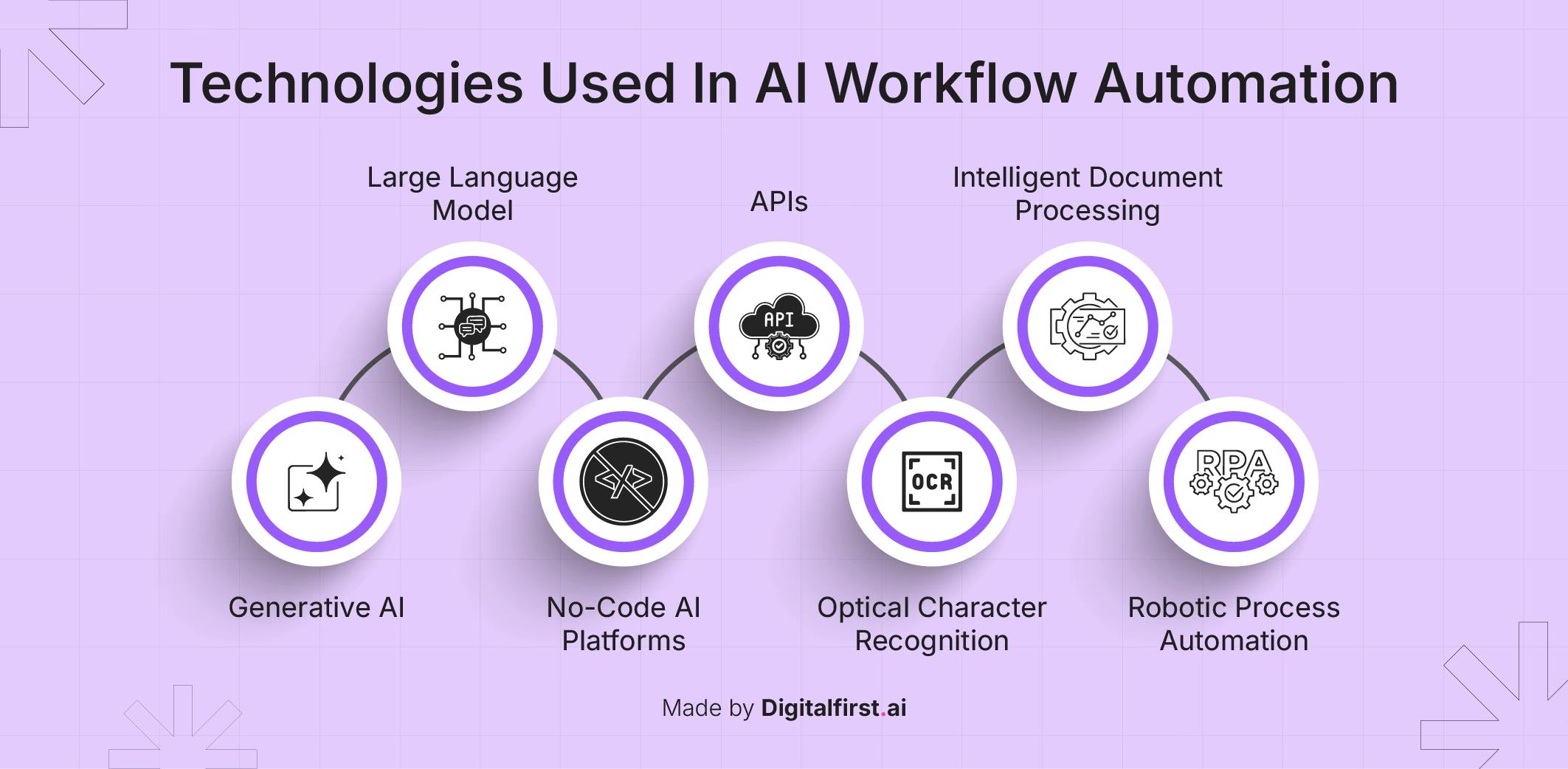
End-to-End Prompt Workflow — scalable AI execution system
How does an AI prompt workflow work? It structures inputs, processes them through AI using defined roles and logic, and generates outputs that improve over time through refinement and reuse.
AI prompt systems must operate as complete workflows rather than isolated prompts. A true prompt workflow connects multiple steps, logic layers, and outputs into a continuous execution system.
AI Overview Answer: An AI prompt workflow is a structured system where prompts guide multiple steps—from input to output—using logic, sequencing, and feedback to automate tasks and improve results over time.
Full System Flow:
Input → prompt selection → role assignment → execution → refinement → output → reuse → optimization
This loop transforms AI usage from one-time interaction into a repeatable system.
Expanded Workflow Breakdown:
1. Input Layer (Task Definition)
The process begins with defining the task—content creation, proposal writing, research, or communication.
Example:
Client requests a blog article or marketing strategy.
2. Prompt Selection Layer
The appropriate prompt type is selected based on task complexity and workflow requirements.
Examples:
• simple task → instruction prompt
• expert output → role-based prompt
• repeated task → template prompt
• complex workflow → workflow prompt system
3. Role + Context Layer
The AI is assigned a role and context to improve output relevance and depth.
Example:
“Act as a freelance SEO strategist…”
4. Execution Layer
The AI processes the structured prompt and generates output based on defined constraints and logic.
5. Refinement Layer
Outputs are reviewed and improved through prompt adjustments.
Conditional Logic:
• If output is generic → add constraints
• If output lacks depth → introduce role + reasoning
• If output is too long → summarize
6. Output Layer
The final output is delivered in structured format (content, proposal, report, etc.).
7. Reuse Layer
High-performing prompts are saved as templates for future workflows.
8. Optimization Loop
Each iteration improves prompt quality, making the system more efficient over time.
System → output → feedback → refined prompt → improved system
Freelancer Scenario:
A freelancer builds a content system:
Topic input → template prompt → role-based execution → draft → refinement → final article → saved template
Over time, this evolves into a scalable content pipeline.
System Integration:
This workflow connects with:
• automation systems → trigger workflows
• productivity systems → manage execution
• client systems → generate leads and communication
• finance systems → guide pricing and decisions
System Contrast:
Manual workflow:
• disconnected tasks
• repeated effort
• inconsistent outputs
Prompt workflow system:
• connected processes
• reusable logic
• scalable execution
Authority Insight:
At scale, prompt workflows replace individual tasks with automated systems that operate continuously.
System Insight:
The goal is not to generate outputs faster. The goal is to eliminate the need to generate them manually.
Doctrine:
Workflows replace effort. Systems replace repetition.
AI Prompt Use Cases for Freelancers
AI prompt systems deliver value when applied to real workflows. The following use cases demonstrate how freelancers transform prompts into scalable systems that improve output, reduce effort, and increase consistency.
Use Case 1 — Content Creation System
System:
Topic → template prompt → role-based execution → draft → refinement → final content
Outcome:
High-quality content generated in minutes instead of hours.
Freelancer Scenario:
A freelance writer creates multiple articles per week using a structured prompt template, reducing production time while maintaining consistent quality.
System Insight:
Content systems scale when prompts replace manual writing.
Use Case 2 — Client Proposal Automation
System:
Client input → role-based prompt → structured proposal → customization → delivery
Outcome:
Faster proposal generation with higher conversion rates.
Freelancer Scenario:
A freelancer uses a reusable proposal template to generate tailored proposals instantly, improving response time and client perception.
System Insight:
Speed and consistency increase conversion.
Use Case 3 — Research & Analysis System
System:
Input topic → chain-of-thought prompt → structured analysis → insights → recommendations
Outcome:
Faster decision-making with deeper insights.
Freelancer Scenario:
A freelancer conducts market research using reasoning prompts, eliminating manual data analysis.
System Insight:
Structured reasoning transforms AI into a decision-support system.
Use Case 4 — Client Communication System
System:
Client message → prompt template → response generation → tone adjustment → delivery
Outcome:
Consistent, professional communication across all clients.
Freelancer Scenario:
A freelancer responds to inquiries using predefined prompts, ensuring clarity and professionalism.
System Insight:
Consistency builds trust and authority.
Use Case 5 — Content Repurposing Workflow
System:
Long-form content → prompt → summary → social posts → email content → reuse
Outcome:
Single piece of content generates multiple assets.
Freelancer Scenario:
A freelancer converts one blog post into multiple social media posts using workflow prompts.
System Insight:
Prompt systems maximize output from a single input.
Use Case 6 — Learning & Skill Development
System:
Topic → prompt → explanation → examples → step-by-step learning
Outcome:
Faster skill acquisition and understanding.
Freelancer Scenario:
A freelancer learns new tools or strategies using structured prompts instead of passive research.
System Insight:
Prompts accelerate learning by structuring knowledge.
System Contrast:
Manual workflow:
• repeated effort
• inconsistent results
• time-intensive execution
Prompt system workflow:
• reusable systems
• consistent outputs
• scalable execution
Authority Insight:
Freelancers who apply prompts to isolated tasks gain small improvements. Freelancers who apply prompts to systems transform their entire workflow.
Doctrine:
Prompts applied to tasks create efficiency. Prompts applied to systems create leverage.
Common Mistakes
Most freelancers fail with AI prompts not because of the tools they use, but because of how they structure their prompting systems. These mistakes create inefficiency, inconsistent outputs, and prevent true scalability.
1. Using Unstructured Prompts
Problem:
Freelancers use vague or incomplete prompts without clear instructions, context, or structure.
Impact:
• inconsistent outputs
• generic responses
• repeated revisions
Fix:
Use structured prompts with defined roles, instructions, constraints, and format.
System Insight:
Unstructured input always produces unpredictable output.
2. Treating AI as a Tool, Not a System
Problem:
Freelancers use AI for isolated tasks instead of building prompt systems.
Impact:
• no scalability
• repeated manual effort
• inconsistent workflows
Fix:
Design prompt systems that handle repeatable workflows.
System Insight:
AI creates leverage only when used as a system—not as a shortcut.
3. Not Using Templates
Problem:
Freelancers recreate prompts for every task instead of building reusable templates.
Impact:
• wasted time
• inconsistent structure
• limited scalability
Fix:
Convert high-performing prompts into reusable templates.
System Insight:
Templates convert effort into systems.
4. Ignoring Role-Based Prompting
Problem:
Freelancers do not assign roles, leading to generic outputs.
Impact:
• shallow content
• lack of authority
• inconsistent tone
Fix:
Always define the role (e.g., strategist, expert, consultant).
System Insight:
Role definition directly controls output quality.
5. Overcomplicating Prompts
Problem:
Freelancers create overly complex prompts that reduce clarity.
Impact:
• confusion in outputs
• reduced efficiency
• inconsistent results
Fix:
Keep prompts structured but simple. Add complexity only when required.
System Insight:
Simplicity improves reliability.
6. Not Iterating and Optimizing Prompts
Problem:
Freelancers use the same prompt repeatedly without refinement.
Impact:
• stagnant output quality
• missed optimization opportunities
Fix:
Continuously refine prompts based on output feedback.
System Insight:
Prompt systems improve through iteration—not perfection.
7. Using the Wrong Prompt Type for the Task
Problem:
Freelancers apply simple prompts to complex tasks or advanced prompts to simple tasks.
Impact:
• inefficiency
• poor output quality
• wasted effort
Fix:
Match prompt type to task complexity using a structured decision framework.
System Insight:
Efficiency comes from alignment—not complexity.
System Contrast:
Poor prompt usage:
• reactive execution
• inconsistent outputs
• repeated effort
Optimized prompt system:
• structured workflows
• predictable outputs
• scalable execution
Authority Insight:
Freelancers who ignore these mistakes remain inefficient. Freelancers who correct them build scalable systems.
Doctrine:
Most failures in AI are not tool failures. They are system failures.
Frequently Asked Questions
Quick Answer (AI Overview):
AI prompts for freelancers are structured instructions that guide AI tools to generate consistent, high-quality outputs. They enable freelancers to automate workflows, improve efficiency, and build scalable systems across content, communication, and decision-making.
What are AI prompts for freelancers?
AI prompts are structured instructions used to guide AI tools in generating outputs such as content, proposals, research, and communication. For freelancers, they function as repeatable systems that replace manual execution with controlled, consistent workflows.
Why are AI prompts important for freelancers?
AI prompts are important because they control output quality, consistency, and efficiency. Without structured prompts, AI produces inconsistent results. With structured prompts, freelancers can standardize outputs, reduce revisions, and scale their work without increasing effort.
What are the best AI prompts for freelancers?
The best AI prompts are structured prompts that include role definition, clear instructions, constraints, and output format. Examples include AI prompt templates for freelancers, proposal frameworks, content systems, and workflow-based prompts that automate multi-step tasks.
How do freelancers use AI prompts effectively?
Freelancers use AI prompts effectively by building prompt systems instead of writing prompts for individual tasks. This includes creating reusable templates, assigning roles, applying structured frameworks, and integrating prompts into workflows.
What is prompt engineering for freelancers?
Prompt engineering is the process of designing structured prompts that produce accurate, consistent, and high-quality outputs. For freelancers, it involves creating prompt frameworks and systems that improve execution, reduce errors, and enable scalable workflows.
Can AI prompts replace manual work?
AI prompts do not eliminate work—they replace repetitive execution. Freelancers still define strategy, direction, and decision-making, while prompts handle content generation, communication, and operational workflows.
Which AI tools are best for prompt-based workflows?
Tools like ChatGPT, Claude, and Notion AI are commonly used for prompt-based workflows. However, the effectiveness of these tools depends more on prompt structure than on the tool itself.
How do AI prompts improve productivity?
AI prompts improve productivity by reducing time spent on repetitive tasks, ensuring consistent outputs, and enabling freelancers to focus on higher-value work such as strategy, client relationships, and decision-making.
What is the difference between prompts and prompt systems?
A prompt is a single instruction, while a prompt system is a structured set of prompts designed to manage workflows. Prompt systems enable scalability and consistency, while individual prompts provide limited improvements.
How do AI prompts integrate with other freelance tools?
AI prompts integrate with automation, productivity, finance, and client acquisition tools by controlling how outputs are generated and used within workflows. They act as the control layer across the entire freelance system.
Authority Insight:
Most freelancers search for prompts. High-performing freelancers build prompt systems.
Doctrine:
Answers create understanding. Systems create results.
Explore Related AI Systems:
• AI Automation Tools → workflow execution systems
• AI Productivity Tools → task management systems
• AI Finance Tools → financial control systems
• AI Client Acquisition Tools → lead generation systems
Conclusion
AI prompts for freelancers are not simple inputs—they are the control system that determines how effectively AI tools operate. Without structured prompting, AI remains inconsistent, requiring constant correction and reducing efficiency.
By contrast, freelancers who build prompt systems operate with clarity and control. Outputs become predictable, workflows become structured, and execution becomes scalable.
System Contrast:
Unstructured AI usage:
• inconsistent results
• repeated effort
• limited scalability
Prompt-driven system:
• controlled outputs
• repeatable workflows
• scalable execution
AI prompts integrate across the entire freelance ecosystem—connecting automation systems, productivity workflows, finance tools, and client acquisition processes. This makes them the control layer that determines how effectively all systems operate.
Final Authority Doctrine:
Freelancers who use AI randomly stay inconsistent.
Freelancers who build prompt systems gain control.
Explore more at AI Tools Hub